Showing posts with label Laptops. Show all posts

Friday, October 23, 2015

Did You Know About These Built-In Battery Saving Modes In Windows 10?

In case you didn't know, Windows 10 has a lot of neat little things built-in that allow you to save your battery life for longer. Sure there is the traditional power options menu that allows you to pick how long your computer should stay awake when you're not using it, but that's boring. What's cool is the new battery saver feature that switches off things like push notifications (Yes we know, your PC operating system has push notifications because Windows 10 was designed with mobile devices in mind too, get over it). So what do you need to know about these new battery settings?

The Power & Sleep menu, which can be accessed by going to Settings > System > Power > Sleep, isn't anything new. From this menu, you can choose how long your computer can be idle before it automatically shuts off the screen or goes into Sleep Mode. In addition to that, you can also customize it to do so when your computer is plugged in or running solely on battery power. There are also Additional Power Settings that you can click on, which opens up the Power Options menu in the Control Panel. From here you can edit your power plans, choose what happens when you close your laptop lid, or decide whether or not you need a password to unlock your computer when it wakes up from Sleep Mode.

A new feature with Windows 10 is Batter Saver. This is a battery-saving power mode that has been specifically optimized for Windows 10. This means that it can do things like limit background app activity and push notifications. This mode is very similar to ones that you would find on mobile devices, like smartphones or tablets. In addition to this, Batter Saver will automatically turn on when your laptop drops below 20% battery life though you can turn that off manually by going to Settings > System > Battery Saver and turning it off.


You can also tinker with Battery Saver mode. By going to the Battery Saver menu, click Battery Saver Settings to bring up the settings menu. From here you can adjust the point at which Batter Saver mode automatically kicks on from a range of 5% to 100% battery life. You can also choose whether or not to allow push notifications or lower screen brightness in Battery Saver mode or add app exceptions. Apps that you want to exclude from Battery Saver mode will be able to run in the background and send push notifications at all times.

The main Battery Saver menu allows you to see how much of your battery life is being used by different apps, simply click Battery Use to see. This will help you determine which apps to disable in Battery Saver mode, which is extremely useful. You can turn off the apps that drain the most battery life and not even worry about the ones that don't use any at all.

If you find yourself always needing to be connected when you're using your laptop and you can't figure out why your Windows 10 device is using so much power, consider going into some of these settings and tinkering around with things. You might be surprised at how much more efficient your battery usage will become and how much longer your laptop will last without having to be plugged in.

Content originally published here

Tuesday, March 11, 2014

Magnetic Materials Could Make Computers 1,000 Times More Powerful

If you have ever had to actually use your laptop on your lap, you know all too well that they can produce a ton of heat, especially when the processor is working hard. No matter how advanced computer technology gets, the amount of heat that a computer produces is something we can't seem to get away from. If you think about it, all of the extra heat given off is just wasted energy that could be used for something else. A team of engineers at UCLA have found a way to make integrated circuits more efficient using a class of magnetic materials that are called multiferroics.

Basically, everything you use daily, like your computer, phone, TV, and many other things, relies on tons of transistors packed together making an integrated circuit. When chained together, transistors act as logic gates. The energy passing through these transistors results in large amounts of heat and loss of electrons. There really shouldn't be a way around it, but multiferroic materials have found a way to bypass this.

By simply applying an alternate voltage, a multiferroic material can be switched on or off. Doing this allows it to carry power to different parts through spinning electrons instead of actually moving them. This effect is call a "spin wave bus". The energy of the wave moves in, but the actual molecules don't have to move at all. It is a little bit hard to understand, but trust me... that's how it works.

Do You Need More Power For Your Next Office Project? Click Here To Check Out The Cost Saving Options On Your Rentals From www.Rentacomputer.com!

There was actually an experiment that the team did to test the ability of the materials to keep a stable spin wave bus. The device that they used in this experiment was made of nickel-based film on a piezoelectric substrate. The initial voltage is applied here to generate the spin wave. In the middle of the chip they used for the experiment was a 5-micrometer-wide ferromagnetic strip, which is where everything happens. The strip is the waveguide for the spin wave bus and directs power from one section to another without moving any electrons at all.

The experiment worked and successfully generated a voltage-driven spin wave. It is still a super long way away from replacing a regular charge current, but the team thinks that the improved efficiency of this method could make processors 1,000 times more efficient at very least. This would mean that there could be a whole new generation of computers that could work so much harder with a lot less power. The possibilities are endless.

Friday, January 13, 2012

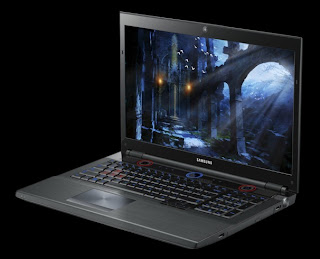
Upgraded Samsung Series 7 Gamer Laptop Set to Hit U.S. in April

Samsung Series 7 GamerUs laptop gamers here in the states have been pretty envious of our European brothers as they have had the privilege of buying the Samsung Series 7 Gamer notebook since last spring. Well, this spring (April, to be specific) that envy dies and becomes reborn as jubilation as Samsung will be shipping the Series 7 Gamer to us Yanks while giving it a nice increase in specs at the same time.

The 17" gaming laptop will still have the same aesthetics, as well as the same external features, as its European counterpart, including the 2.1 speaker setup with down-firing Subwoofer, super-bright screen and that big knob thingy that switches the device between power modes, like the Gaming Mode, which clocks up the CPU turbo mode, changes the keyboard backlighting, disables the Windows key and a few other things. The only real external difference is the lack of a 3D display option and the addition of a DisplayPort output.

Crack this bad boy open and you will be able to find the differences. On the inside the Series 7 Gamer gets a nice new set of parts. The second generation Intel Sandy Bridge Core i7 processor is gone, replaced by a quad-core third-generation Intel Ivy Bridge Core i7 processor instead. In addition to that, the graphics have received an increase from the Radeon HD 6970M to the upcoming GeForce GTX 670M. You will still have a Blu-ray drive as well as the 2TB hard drive so nothing's new there.

You will be able to grab this mobile gaming giant when it is released in April for a reasonable $1,799, or whenever Intel's high-end Ivy Bridge chips and Nvidia's next-generation GPUs are ready to go, which we hope is by April because, honestly, we can't hold out on this laptop forever.

Source: PC World - Samsung to Bring Series 7 Gamer to the U.S., With Upgrades


Put your eye on the problem with Camera Security Now, installing security cameras since 1999. We install in the US and we can help you do it yourself.


Call us toll free 877-422-1907 between 8am EST and 5pm PST M-F. Talk to an expert about your serious security camera needs.

Monday, May 31, 2010

Intel Launches Core i3/i5/i7 Chips for Ultra-Portable Laptops

Intel Core i3/i5/i7 ProcessorsDespite promises of a laptop with an all-day battery life coupled with an inexpensive price, Intel's ultra-low voltage processors, otherwise known as CULVs (Consumer Ultra Low Voltage), haven't exactly been living up to the hype. Part of the reason is that Intel hasn't updated their mobile line of processors with its new Core technology, instead their CULV line has simply been based on Core 2 Duo technology. That is until now.

The chipmaking giant Intel has released their new ulta-low voltage versions of its 32-nm “Nehalem” Core i3, Core i5, and Core i7 processors. This means that Intel’s premiere mainstream processors have been slightly downsized so they can now be installed inside power-sensitive ultra-portable notebook computers. These new chips not only pack a significant performance punch, which Intel says is about 30% faster than their previous ultra-low-voltage offerings, but also use 15 percent less power in the process. The new chips will be identified from their larger counterparts by their part numbers which will end with the letters "um" (i.e. Intel Core i5-430um or Intel Core i7-640um).

“Consumers crave laptops that offer style and performance, and the new 2010 Intel Core Ultra-Low Voltage processors for ultra-thin laptops delivers both, in one sleek design,” said Intel PC Client Group VP and general manager Mooly Eden, in a statement. “Not only are laptops becoming ultra-portable, but with the new processors inside, users will see faster response times and less waiting.”

Like their bigger brethren, ULV versions of the Intel Core chips will feature Turbo Boost and Hyper-Threading technologies enabling the processors to dynamically overclock themselves and devote resources to a single processor core. In addition, the new processors will have a thermal envelope of 17W, which is at least twice as energy efficient as their standard volt Core processors. However, Intel will not be converting its ultra-thin processor offerings completely over to the Core line. ULV versions of the Celeron and Pentium processors will continue to be available to manufacturers and will still be a mainstay among many laptops in the future.

It seems the direction that Intel wants to take its new chips is towards a strange middle ground between very affordable and highly portable, yet slower-performing netbooks and even full-size traditional laptops. The MacBook Air is an example of an ultra-thin laptop that offers powerful portability but is simply too expensive for the average consumer. On the other hand, there is the Toshiba T135 series of ultra-portable laptops which seem to attract far more interest than the Macbook Air for its more reasonable price tag despite being less powerful.

Then there are ultra-thin laptops which tout enhanced performance, such as dual-core Atoms, which offer negligible performance improvements for their cost. It appears that consumers are more interested in average and smaller sized laptops which deliver on affordability. Intel promises that systems will start appearing in June equipped with their new ULV processors, so we'll see soon enough just how they stack up. Already Intel says more than 40 designs based on the chips have been confirmed and are already in the works from makers such as Acer, Lenovo, Asus, and MSI.

Looking for Computer / PC Rental information? Visit the www.rentacomputer.com PC Rental page for your short term business PC needs. Or see this link for a complete line of Personal Computer Rentals.

Thursday, March 25, 2010

Make Your Computer Last Longer

Make Your Computer Last Longer
The average computer lasts anywhere from two-five years. Eventually, your computer will tear up beyond repair or become so out-of-date that you can no longer use the latest software or accessories along with it, and you'll have to begin the dreaded, inevitable search for a replacement. Buying a new computer is a hassle if you don't know exactly what you're looking for and you aren't familiar with what's current. And of course, with today's economy and job market, you're probably cutting corners whenever possible. New computers can be expensive. Here are a few tips on how you can make your current computer last longer.

If your computer is older and it's running well, there's no need to get rid of it just yet. If you're using it for simple tasks such as word processing, surfing the internet, or manging pictures, age shouldn't be much of a factor. Routine maintenance will keep your computer running smoothly, save you money, and maybe even extend the life of your PC.

The temperature can have a big impact on your computer and cause a lot of damage. Computers generate a lot of heat and at one time had to be stored in climate-controlled rooms. You don't need to keep your living room or home office at a set temperature, but you do want to keep your PC from overheating. Make sure it's not left in direct sun too long and make sure it's properly ventilated.

You'll also want to keep your computer clean. Extra dust on or around your PC can trap heat and making your cooling fan work even harder. This can lead to lots of wear and tear, and eventually to your fan giving out all together. Be careful where you place the computer. Putting the machine on the floor can lead to lots of dirt and dust build-up. Also avoid any rooms with heavy dust build-up. Of course, no matter how careful you are, your computer is going to accumulate some dust, so you might want to blow it out with compressed air every so often.

Laptops are becoming extremely popular and generally don't last as long as desktops. You may leave your laptop plugged in all the time, but leaving it plugged in is bad for your battery. Apple even recommends users don't keep their laptops constantly plugged in and use the battery at times. A typical battery lasts 300-500 charge cycles, but if you find your battery struggling to stay charged, replacing it is a good idea and an inexpensive way to prevent yourself from having to buy a whole new computer.

Restarting your computer is another way to keep things flowing. Most people reboot when they hit trouble, hoping for a fresh start when the computer comes back on and this is actually a good idea. However, many people also leave their computer running 24/7. There's no set time as to how often you should reboot, but rebooting can give your computer a fresh start, speed things up, and serves as a small refresher to your PC.


Looking for Computer / PC Rental information? Visit the www.rentacomputer.com PC Rental page for your short term business PC needs. Or see this link for a complete line of Personal Computer Rentals.

Sunday, March 7, 2010

Desktops Gone in Three Years?

Desktops Gone in Three Years?

Everyone (except maybe my parents) know that desktops are becoming less popular. People are trading in their old computers for newer, more portable models or other devices that allow them to perform many of the same functions (browse the web, check email) on the go. But while speaking at the Digital Landscapes Conference, Google Vice President of Global Ad Operations, John Herlihy, made the shocking prediction that desktops would become obsolete in as little as three years. And he says laptops aren't far behind:

"In three years time, desktops will be irrelevant. In Japan, most research is done today on smart phones, not PCs. Mobile makes the world’s information universally accessible. Because there’s more information and because it will be hard to sift through it all, that’s why search will become more and more important. This will create new opportunities for new entrepreneurs to create new business models - ubiquity first, revenue later."

But not everyone sees it that way. People from other major tech companies say that while it's true that smartphones and other similar gadgets are becoming increasingly popular, that doesn't necessarily mean desktops, and especially laptops, are going anywhere. Experts believe people will continue to brace new mobile technology, as well as keeping their home computers for other tasks, allowing the two to compliment each other.

Have you ever tried to type on a mobile phone? No matter how fancy your keyboard is, after a while, your hand's going to cramp up and increasing the size of the mobile phone is impractical. In that case, you may as well be carrying around your laptop. Tasks such as creating large word processing documents on your cell phone is probably not going to become trendy anytime in the near future which would make things so much harder on students and working professionals. The same could be said for screen size and weight. Increasing those things would defeat the purpose of having a mobile phone.

Comfort's not the only reason. First of all, battery life is a major factor. Right now, increasing battery life would mean the same thing as increasing the comfort - more power would mean larger phones. And never mind other factors such as software design. Could you imagine gaming only on your phone?

Personally, I'm not an expert, but I think laptops sales will continue to soar. I also think desktops will be around for longer than three years. They may continue to decrease and in the long run, become obsolete, but I just can't picture anyone giving up their computers in favor of mobile phones.


Looking for Computer / PC Rental information? Visit the www.rentacomputer.com PC Rental page for your short term business PC needs. Or see this link for a complete line of Personal Computer Rentals.

Tuesday, January 19, 2010

Will Desktops Ever Make a Comeback?

Will Desktops Make a Comeback

Laptops are becoming increasingly popular. Personally, I haven't owned a desktop in five years and don't see myself ever going back to being desktop-only household. Nothing beats using my wireless laptop from anywhere in my home. If I'm cooking from a recipe I found online, I just put the computer on my kitchen counter. If I'm sick, tired or just being lazy, I can take the laptop to bed with me. And on nice spring days, I can work outside, on my porch, vs. being tied to my desk and stuck inside all day. Not to mention I can take my computer with me anywhere I go, whether it be a vacation or to a coffee shop with free Wi-Fi.

But it seems as though I'm not alone. Desktop sales are falling and laptop sales on the rise. Does that mean desktops are gone forever? Not according to a few people at AMD and Via.

Patrick Moorehead, a vice president at AMD, told the New York Times he sees the computers reemerging as "small form-factor desktop[s]." Via Vice President Richard Brown is also optimistic, asserting that desktops in the corporate world are not going away anytime soon.

But according to research firm IDC, desktop shipments will decline over the next few years. In the United States, in 2009 alone, desktop shipments were expected to drop 14.2%. In 2010, they will fall another 3.6% and 1.9% in 2011. However, international desktop shipment numbers look a little different. While shipments were expected to decline 12.9% in 2009, they are expected to gradually rise again in the following years: 0.1% in 2010, 1.6% in 2011, 2.0% in 2012 and 0.9% in 2013.

According to Brown, that worldwide increase can be attributed to Asia, "In China and elsewhere, those people have started to desire a real computer when they get home. They want a bigger screen and more power. The desktop offers that."

Even so, laptops and other portable computer shipments are expected to increase at unbelievable, double-digit rates over the next four years, due to the fact that users are becoming increasingly mobile. There's no question notebook computers will continue to dominate the market in the near future but as for the desktop, only time will tell what becomes of it.


Looking for Computer / PC Rental information? Visit the www.rentacomputer.com PC Rental page for your short term business PC needs. Or see this link for a complete line of Personal Computer Rentals.

Saturday, November 7, 2009

New Trends: Computers Give Up CD Drives for Touch-Screens

New Trends: Computers Give Up CD Drives for Touch-Screens
A recent Associated Press report points out that personal computers are changing rapidly. It has definitely been a year of "out with the old and in with the new" as far as computers go. Laptops and Desktops are missing familiar components, slimming down and gaining lots of cool, new, unique features. Despite the popularity of gadgets such as the iPhone, PCs are still at the heart of the digital world and will likely stay that way for a while to come...even if they look and act a little differently.

One noticable change in the world of new computers is the lack of drives. Optical drives that play CDs and DVDs have been an important part of computers for over a decade. Whether you're watching a movie, listening to music, or installing software, the drives have been part of almost everyone's daily computer usage. Apple started getting rid of drives about two years ago when it first introduced the MacBook Air. Even though that wasn't a mainstream computer, due to its $1,800 pricetag, it was the start of what looks to be a popular trend. Netbooks, which are used mostly for web-browsing, start at $250 and are growing in popularity.

People are using their little laptops to download software, music and movies, while enjoying the convenience and price. The availability of Wi-Fi and cellular internet service combined with services that let you store files online are making the need for drives almost obsolete. Of course, there are the die-hard DVD watchers and CD burners who are not yet ready to give up those drives, but the lack of drives in many computers, particularly laptops does often lead to a lighter price and a much lighter load.

These days, people are also tending to purchase less powerful computers and this is another reason netbooks are becoming more popular. Everyone's been inside a retail establishment and listened to a salesperson rattle off a list of processors, graphics cards, gigabytes of memory and sizes of hard drives, but unless you're a hard-core gmer or a professional video editor, all of that stuff isn't really necessary. People are looking for computers that let them browse the web, email and use word processing applications more than anything right now.

Computer manufacturers aren't just competing with each other these days, they're also having to stand up to smartphone manufacturers, as well. People want to be connected 24/7 it seems and it's easier for that to be possible via a cell phone. "Smarbooks" are being created - think a smartphone-like device that is closer to the size of your laptop than your cell phone, and computer companies are starting to focus on laptop appearanes. Colors, patterns, themes, designs, shapes, and materials are all considered to be an important part of computer manufacturing lately, allowing users to treat their computers more like fashion accessories than tools. People also want thin and light computers that are easier to carry.

And finally, touch-screens are becoming a popular computer trend. Ever since the iPhone was developed in 2007, multi-touch has become more prominent in today's technology. The recently released Windows 7 includes support for a number of multi-touch applications and companies such as Dell and HP are designing software that allow you to browse everything from the web to your music library with your fingers instead of a mouse. And while experts say the touch-screen won't replace the mouse and keyboard, it will most likely become just as important.

Monday, November 2, 2009

Lenovo Unveils Six New Windows 7-Friendly Computers

Lenovo Unveils Six New Windows 7-Friendly Computers
Lenovo's new computers aren't just Windows 7-friendly, they also include Enhanced Experience software that improves system boot and shutdown times. Three new laptops, the IdeaPad U150, U550 and Y550P, and three new desktops, the IdeaCentre B500, K300 and H230, were introduced by the company last week. Each one runs Intel processors ranging from the Core 2 Duo hips to the Core i7 PC processor.

The Enhanced Experience software comes from a Lenovo collaboration with Microsoft. It includes multimedia tools that produce quality graphics and maintenance tools that improve data recovery and back-up, as well as anti-virus protection. It boots Windows 7 up to 56% faster than Windows XP and Vista and shuts down in as little as five seconds.

The new laptops range from high performance to slim and light. The Y550P features the Intel Core i7 processor and Nvidia discrete graphics. The 15.6 inch screen is Lenovo's most powerful laptop and it will set you back $1,149. The U150 is only half an inch thick and weighs under three pounds, with a 11.6 inch, high definition display. Its only $585, supports up to 8 GB of system memory and features an Intel Core 2 Duo processor. The U550 is considered the most mainstream of the laptops. For $650, you get a 15.6 inch display that runs the Core 2 Duo chip, a built-in DVD drive, and an integrated fingerprint reader.

As for desktops, the IdeaCentre B500 is an all-in-one system that features an Inteo Core 2 quad-core processor, discrete graphics, up to 8 GB of system memory and and 1 terabyte of storage. For $649, the computer comes with a 23 inch screen, JBL-brand integrated speakers, and a remote. The K300 is a tower desktop. It features a Core 2 quad-core processor, RAID-configured hard drives, and Lenovos power control switch that makes it possible to adjust power level for energy efficiency for maximum power. This one starts at $499. The H230 starts at $449 and is meant to appeal to customers looking for customization.

Lenovo isn't the only company releasing new Windows 7-compatible computers just in time for the holiday season. Acer, Gateway, Sony, and Hewlett-Packard also have new PCs on the market.

Sunday, October 25, 2009

Computers for Windows 7

Computers for Windows 7
The long awaited Windows 7 operating system is here and rumor has it, Microsoft will soon announce several new computers that are designed specifically to run the new OS. However, several computer manufacturers have beat Microsoft to the punch by releasing information about their own new models that will feature Windows 7. Several of them are specially designed to use the OS's touch-screen features.

Hewlett-Packard has four new computers, all with touch-screens. The cheapest of the bunch is the TouchSmart 300, a 20 inch screen desktop that will retail around $900. Next is the TouchSmart 600, also a desktop, sporting a 23-inch screen, and that will sell for about $1,100 (though for $500 more, you can get the version that is able to show video at 1080p resolution). For those not looking for a desktop, there is the TouchSmart tx2 - a tablet computer that will start around $800. And if you happen to be looking for 42-inch touch screen, the $2,800 LD4200tm is your computer.

If you're looking for super-cheap, Compaq (owned by Hewlett-Packard) will be releasing the CQ61z laptop, a 15-inch screen notebook. It doesn't have a touchscreen but it will sell for $399 until right around Christmastime when the price is expected to rise to $499.

Toshiba will release two new Satellite laptops, both with touch-screens. The M505 has a 14-inch screen and should sell for around $950, while the U505 13-inch screen with a "textured finish" will sell for about $1,050.

Thursday, October 22, 2009

Microsoft opens first retail store.


If you've been to any mall in the United States you've probably seen the Apple Store. A store full of every Apple product you can imagine. Well imagine that store only filled with Microsoft Products and color and you'll know what its like inside the new Microsoft Store in Scottsdale, AZ.

Microsoft feels the new store is giving customers a chance to "experience the best of Microsoft and its partners, the store offers customers a select line of laptops, netbooks, all-in-one PCs, Xbox consoles, Windows Mobile phones and one of the largest selections of third-party software titles in any store." A second store will be opening October 29, in Mission Viejo, California.

Microsoft decided a store dedicated to its products is what its customers were looking for and needed. Each store will have various sections and departments focusing on various Microsoft products and needs. You will be able to play with the technology and see how its uses can be utilized for maximum benefit.

The Scottsdale Microsoft Store has tables full of laptops, large screen tv's on the walls, and a vast collection of software and the design has been planned to maximize interaction between the customer, technology and the highly trained staff.

It will also feature a place to customize your products,“If you want to have Disney characters on your laptop or an NFL team on your Xbox, we’ll build a nice library of licensed products that you can use, or you also can bring in a picture of your dog or your family and make it custom,” said store manager, Cheryl Hibbard.

More customization features include a table to create your own ringtone for your Microsoft phone. A place to compare cell phone rates. More than just outer customization the customers can also customize their products from the inside. "Once a PC is purchased, store employees will offer a 15-minute session to help customers set up their passwords and networks, and tailor their browser, e-mail and other applications to their personal preferences. Customers can launch their computer from hibernate the minute they take it home,” she says. “With this set-up session, we’re taking the typical ‘ready to assemble’ PC ownership experience to ‘ready to run’.”

While its still fairly new and only one store, Microsoft feels confident that the stores will help with sales and customer experience with the products Microsoft and its partners have to offer. If it will compete with Apple in this arena, we will just have to wait and see.

Thursday, January 15, 2009

Alienware M-17 Notebook

Alienware M-17Anyone who wants a laptop or any computer for gaming knows exactly where to find one; Alienware. Alienware is the leading producer of top-of-the-line, kick ass gaming computers and the new M-17 notebook is no different.

The M-17 is powered by the world's first ever mobile quad-core CPU's. The intel Core 2 Extreme Quad-Core Processor delivers ridiculous power allowing for you to enjoy more multitasking and faster speeds to allow you to take on next-gen video games that require alot of resource-intensive tasks. Another first for the M-17 is ATI CrossFireX dual graphics. ATI CrossfireX multi-GPU technology brings enhanced performance as well as DirectX 10.1 support. ATI PowerPlay allowe\s the notebook to monitor its GPU usages, automatically conserving energy for less-intensive programs and blowing the roof when necessary boost is needed.

The M-17 comes equipped with a Clearview 17-inch LCD screen which supports extreme high-def 1200p for the highest quality. For some, storing all your files can be a bit of a problem. But with the M-17 all that is water under the bridge. This notebook holds dual 500GB drives in a RAID 0 configuration. And with its wopping 1TB of memory you can hold an astounding 250,000 songs, 250 full-length movies, or 150 games! And, on top of all that, all Alienware 7200RPM drives feature Free Fall Sensor technology for added protection for your important files. The M-17 uses the latest in todays technology to harness up to 4GB of DDR3 memory, this is also Alienwares first notebook to harness DDR 3 memory.

Ever see those ridiculously cool computers in like the James Bond movies? You know, the ones that get your fingerprint or scan your face for access? Haven't you always wanted one of those? Well now you can because the M-17 comes secure with multiple biometric features including a fingerprint scanner and the AlienSense facial recognition software relying on unique double biometric measurments locking out all unauthorized users from accessing your notebook. Now whats cooler than that!?

Even though $1,399 maybe a bit of cash for some, it is worth it! With all the power and features I doubt anyone would be disappointed with this sitting on their lap!